
Overview
- Numeric
- Numbers with decimals
- Example: c(1.2, 2.6, 3.4, 2.2, 5.7)
- Character
- Values made up of strings or letters
- Example: c(“Alabama”, “New Jersey”, “Texas”)
- Factor
- String or numeric variables stored as groups
- Stored as integers with value labels you set
- Integer
- Whole numbers
- Example: c(1, 2, 3, 4, 5)
- Logical
- TRUE or FALSE
- Example: c(TRUE, FALSE, FALSE, TRUE)
Checking and Changing Data Types
Checking Data Types
- Use class() function to check a data type

Changing Data Types
- To change or coerce an object to another data type, the format is as follows:
- as.numeric() converts to numeric
- as.integer() converts to integers/whole numbers
- as.character() converts to character
- as.factor() converts to factor
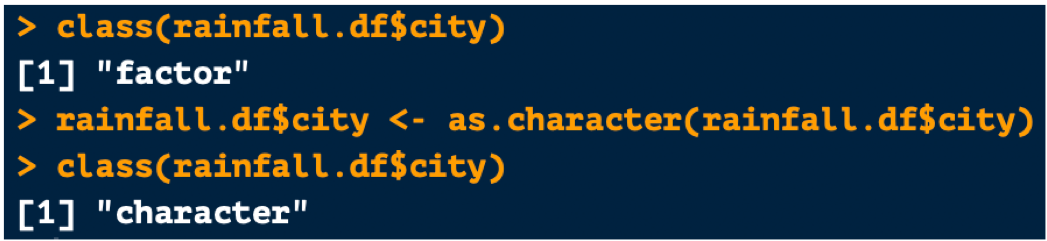
Changing Factor Variables to Numeric
- There is a trick for changing variables from factor to numeric
- Remember: Factor variables are stored as numbers
- The stored number is based on the order or your values
- If you use as.numeric() on a factor variable made up of numbers, the stored number will be returned (which will be meaningless to you!)
- To solve this issue, change the variable to a character variable first, then convert it to a numeric variable
- Use this method:

- Do NOT use this method:

Deep Dive: Factor Variables
What Are Factor Variables?
- Factor variables can be either strings or numeric
- However, in the background, all values are grouped and stored as a number
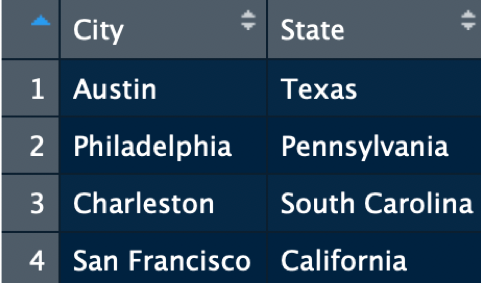
- Below you can see:
- That city is stored as a character variable with string values
- State but is stored as a number
- The string values are labels

Creating Factor Variables
- You can change other data types to factor variables
- Levels and labels can be customized
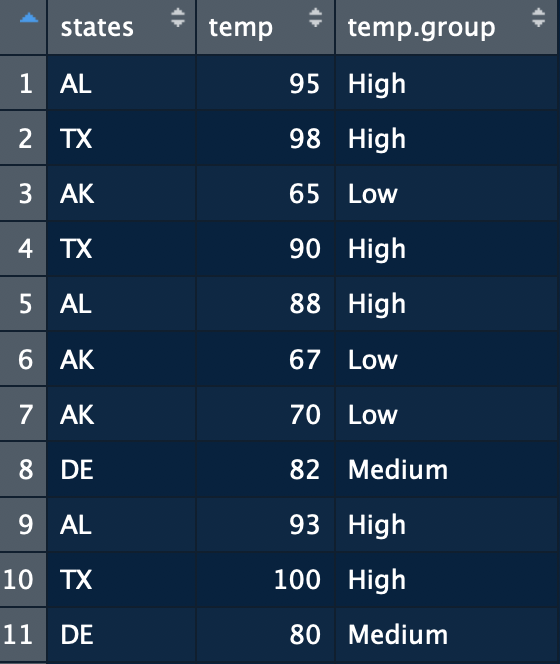
- In the data frame shown below, states is a character variables:

Factor Conversion: “As Is” Method
- As explained above, the as.factor() method can be used to change the states variable to a factor variables as is

Factor Conversion: New Labels
- The state variable can also be changed to a factor variables with different labels
- Example: Changing the state abbreviations to the full state names
- To do this follow the structure below:

- First argument: Variable you want to convert to a factor
- Second argument: The original variable values
- Third argument: The new labels you want to apply to the original values
- Order matters! Make sure the levels and labels values are in the same order!
Factor Conversion: Ordered
- Character variables can also be changed to ordered factors
- This should be done when factor levels have are ordered
- Example: The temp.group variable is ordered, High > Medium > Low
- To do this follow the structure below:

- Add ordered = TRUE argument to the factor() arguments
 Kelsey Emnett, Data Scientist